



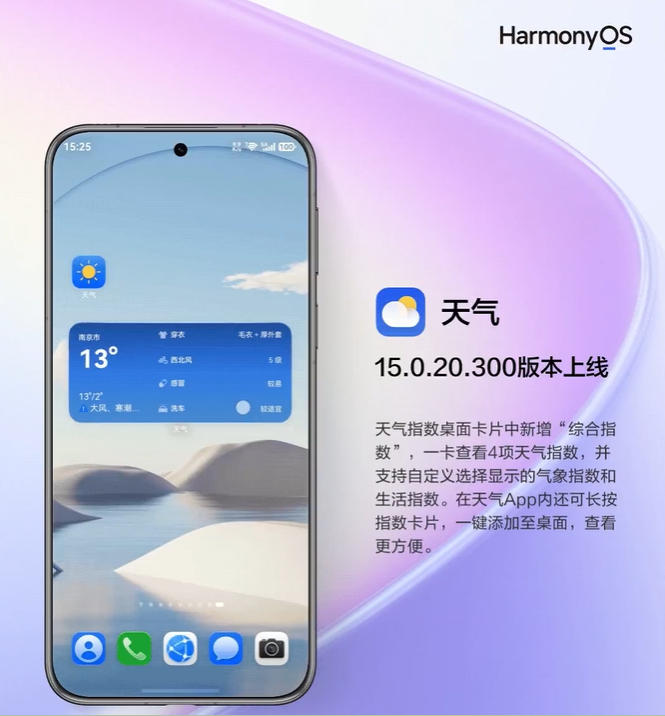
Huawei has rolled out version 15.0.20.300 for its Weather App. The headline feature is a fully customizable Composite Index widget for the home screen. Unlike the previous fixed-format index cards, this new widget lets you view four weather metrics on one card and freely choose meteorological and lifestyle indices.
You can also long-press the card in the Weather App to pin it directly to your home screen. This cuts out the repeated step of launching the full app to check routine data, putting your frequently used metrics front and center on the home screen.
The 15.0.19.300 update introduced AI-powered interpretation of weather data and the card scenario experience on the home screen, setting the stage for the Composite Index card launch in version 15.0.20.300.
Foundation laid by previous version: from “raw numbers” to “actionable advice”
The biggest update in 15.0.19.300 was the full rollout of the app’s AI index-parsing system. Instead of just listing raw numbers for UV, humidity, and air quality, the system analyzes historical trends and impacts of these indices to generate actionable daily guidance.
For the humidity index, for example, the AI pulls in dew point readings and the humidity curve to offer tips like: “Humidity will trend down through the morning before holding at a mild, steady level. Conditions will feel dry, so stay hydrated. Humidity will rise gently after sunset, leaving the air mild and comfortable. Wear an extra layer when heading out early or late to avoid chills.” The view also includes a follow-up prompt, such as “Tips for adjusting indoor humidity for better comfort,” pointing users to more detailed advice.
To access this feature, please follow these steps: open Huawei Weather > select the Hourly forecast card on the home screen > select Daily weather index interpretation.
For the home screen card, the two functions—Flowering period prediction and Today’s moon phase— were added in 15.0.19.300.
The Flowering period prediction tool combines recent weather conditions to provide timely reminders for in-season flowers at their peak, making it easy for users to plan trips on autumn days.
To enable this, please long-press Huawei Weather App > tap the Card > select Hourly weather card > tap Edit > select Fixed display indices > select Flowering period prediction / Today’s moon phase.
The 15.0.20.300 update: from “Interpretation” to “Aggregation”
Version 15.0.20.300 combines multiple indices into one card, so users can check key metrics on the home screen without opening the app or managing separate widgets.
The 15.0.20.300 update is now available to download on AppGallery.